



Tournament operations
Tournament Registration Without Accounts
An invite link that actually registers the team into the tournament, no copy-pasting from a separate form.
In this guide
A Google Forms link followed by a copy-paste into a spreadsheet is still the most common way to register teams for an amateur tournament — and the slowest to fix once something goes wrong. An invite link that registers a team directly into the tournament, with no account for captains and approval plus capacity enforced automatically, replaces that copy-paste. Here’s how it actually works, including its real limitation.
The problem with a form followed by copy-paste
Google Forms collects answers into a spreadsheet, not into your tournament. Someone then has to copy each team into whatever tool actually builds the bracket or schedule, check spelling, remove duplicates, and recount the total every time a new response comes in. If the tournament is already full, nothing automatically stops another signup — someone has to notice and respond manually.
What an invite link changes
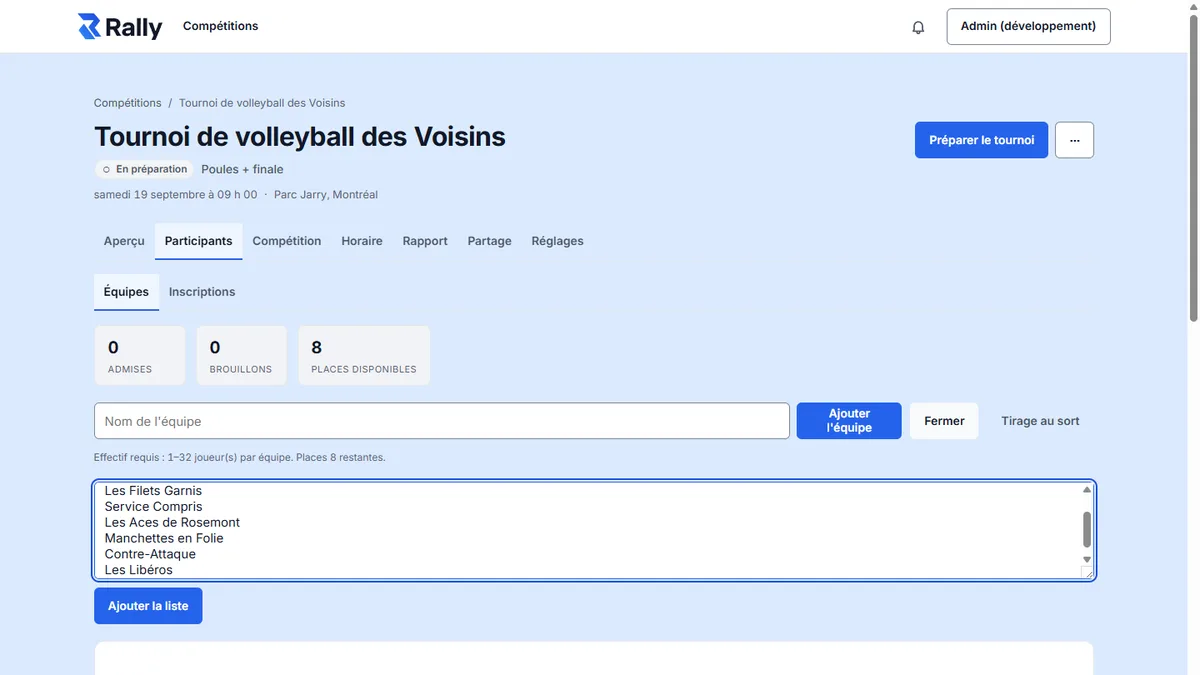
An invite link points straight at the tournament. Every captain or pair who clicks it submits their team and roster into the same system that will later build the schedule and the bracket — not into a separate sheet to re-import.
- No account for captains: the link is enough to submit a team.
- Organizer approval: every registration can be accepted or declined before it counts toward the tournament.
- Capacity enforced automatically: once the maximum number of teams is reached, the system reflects that without anyone counting rows in a spreadsheet.
- Check-in: on arrival, each team confirms it’s present through a link, during a window the organizer opens — useful for catching no-shows early and adjusting the schedule.
- Blind Draw: for formats where partners aren’t known in advance (popular in cornhole), players register individually into a pool and pairs are drawn at random.
In Rally, this is the same flow described on the features page, registration section: invite link, approval, capacity and check-in and Blind Draw are all part of the same flow, with no account required from captains or players.
What “no account” doesn’t mean
No account for captains doesn’t mean no control. The organizer still holds three levers:
- Who gets in: every registration waits for approval, it doesn’t add itself to the tournament automatically.
- How many: capacity set at creation blocks further registrations once it’s reached, without anyone having to watch a running total.
- When: the check-in window opens and closes when the organizer chooses, not continuously.
That’s the difference between a wide-open form and a structured registration flow that still stays simple for captains.
The special case of Blind Draw
Some formats don’t know the teams in advance: in cornhole, for example, players often register individually, then partners are drawn the day of or before the event. Blind Draw covers that case: each player joins a pool without knowing who they’ll play with, and the draw forms pairs once the pool closes. The mechanic stays account-free for players, just like the rest of the registration flow. Running a cornhole tournament.
What competitors do on registration
- JustTourney lets players join an informal match with no account and collects a direct payment to the organizer for those matches — a mechanism Rally doesn’t offer.
- Challonge requires an account to organize, with a registration page that includes entry fees paid via Stripe (0.75 $ US per order on the free plan).
- Playpass builds payment into every tier, with processing fees sliding from 3% (free) down to 1% (top tier).
Rally sits between these approaches: structured like real registration (approval, capacity, check-in), but never routing any money.
What this system doesn’t replace
Rally does not collect or route any entry-fee payment. If your tournament charges a cash entry fee, you’ll need to collect that amount through some other means (e-transfer, cash, an external payment link) and track who paid outside the tool. That’s a real limitation to know before picking a registration tool: competitors like Challonge (fees via Stripe) or Playpass (built-in payment with processing fees) collect paid registrations directly; Rally does not.
After registration: making the tournament findable
Once teams are registered, publishing the tournament to Rally’s public tournament directory gives it a permanent, Google-indexable page — useful for recruiting teams next year or letting a participant find the result afterward. A Google Form closed after the event leaves no equivalent public trace.
A concrete flow
- The organizer creates the tournament and sets capacity (say, 24 teams).
- They share the invite link by email, text or social media.
- Each captain opens the link and registers their team and roster, no account needed.
- The organizer approves or declines each registration; once 24 teams are approved, the link shows the tournament is full.
- The day before or the morning of, the organizer opens the check-in window; each team confirms it’s present through the same link.
- The format and schedule are built from the confirmed teams.
Frequently asked questions
Does a captain need an account to register a team?
No. The invite link is enough to submit the team and its roster. Only the tournament organizer needs an account.
Can a registration be declined after it’s submitted?
Yes. Every registration waits for the organizer’s approval before it counts toward the tournament; declining a team keeps it out of the bracket and schedule.
Can this system collect cash entry fees?
Not inside the tool. Rally does not collect or route any registration payment; you’ll need to collect that amount another way and track it separately.
Sources
Consulted September 26, 2026: justtourney.com, challonge.com/features/tournaments, playpass.com/sports-software/pricing.
Related reading
- Challonge alternatives
- Choosing a tournament format
- Amateur tournament planning checklist
- Running a cornhole tournament
- Rally features: registration
Create a free tournament on Rally.
For your sport

Cornhole tournament
Doubles, cancellation scoring, several sets of boards.